![1512632091642-p-500.png]](https://help.consignorconnect.com/hs-fs/hubfs/1512632091642-p-500.png?width=131&height=50&name=1512632091642-p-500.png)
Still on Classic Rose? See the Classic Rose steps.
Set up rent or any other charge that posts to a consignor's or vendor's account on a schedule - weekly to yearly - until you stop it.
Open the Billing Editor
- Open Menu → Contracts and find the consignor or vendor.
- Press BILLING in the toolbar. The BILLING EDITOR opens with their ACCOUNT # and CONTRACT NAME, and lists the bills they already have.
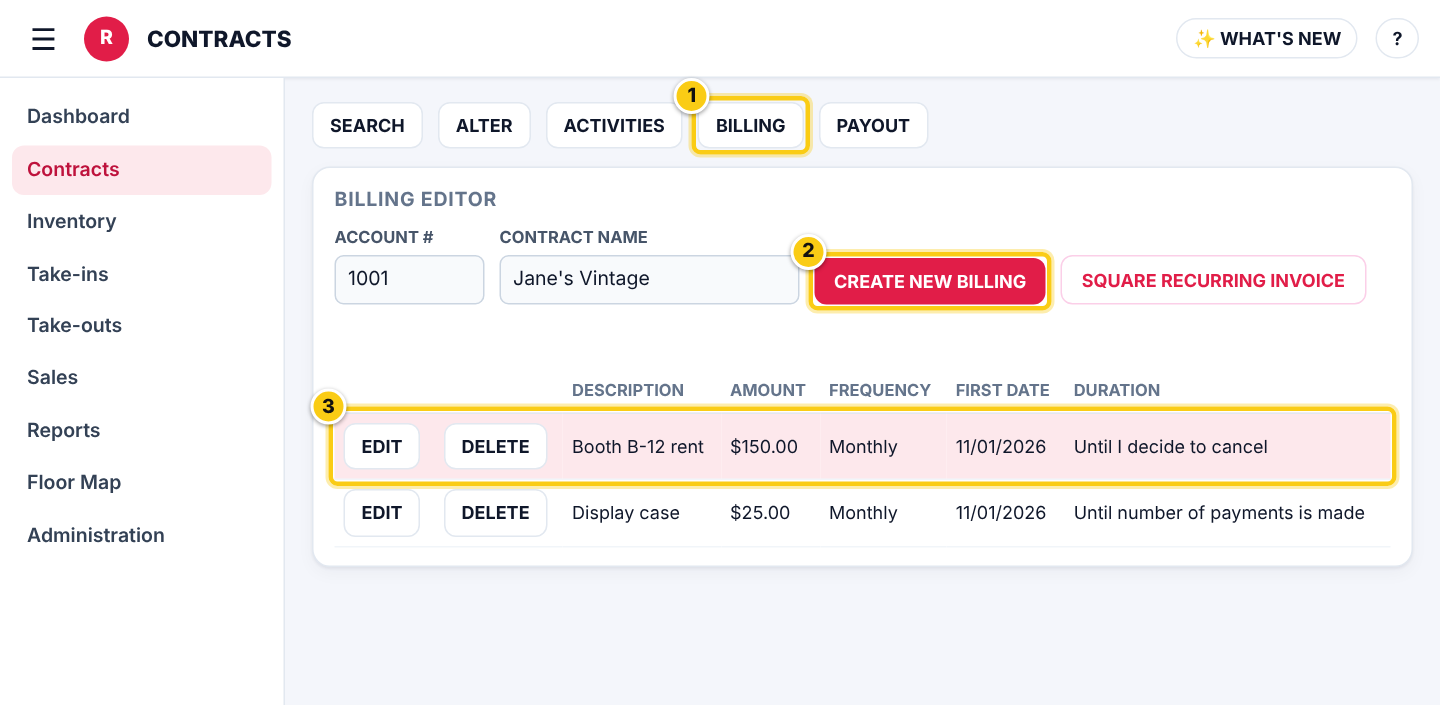
(1) BILLING on the contract, (2) CREATE NEW BILLING, (3) a bill that is running, with EDIT and DELETE.
Create a bill
- Press CREATE NEW BILLING.
- Type the BILLING DESCRIPTION (it shows on the account, for example Booth B-12 rent) and the AMOUNT.
- Pick the FREQUENCY (Weekly, Every 2 Weeks, Every 4 Weeks, Twice a Month, Monthly, Every 2, 4 or 6 Months, Yearly) and the FIRST BILLING DATE.
- Pick the DURATION: Until I decide to cancel, Until an end date (then the END DATE) or Until number of payments is made (then the NUMBER OF PAYMENTS). A REFERENCE is optional.
- Press SAVE.
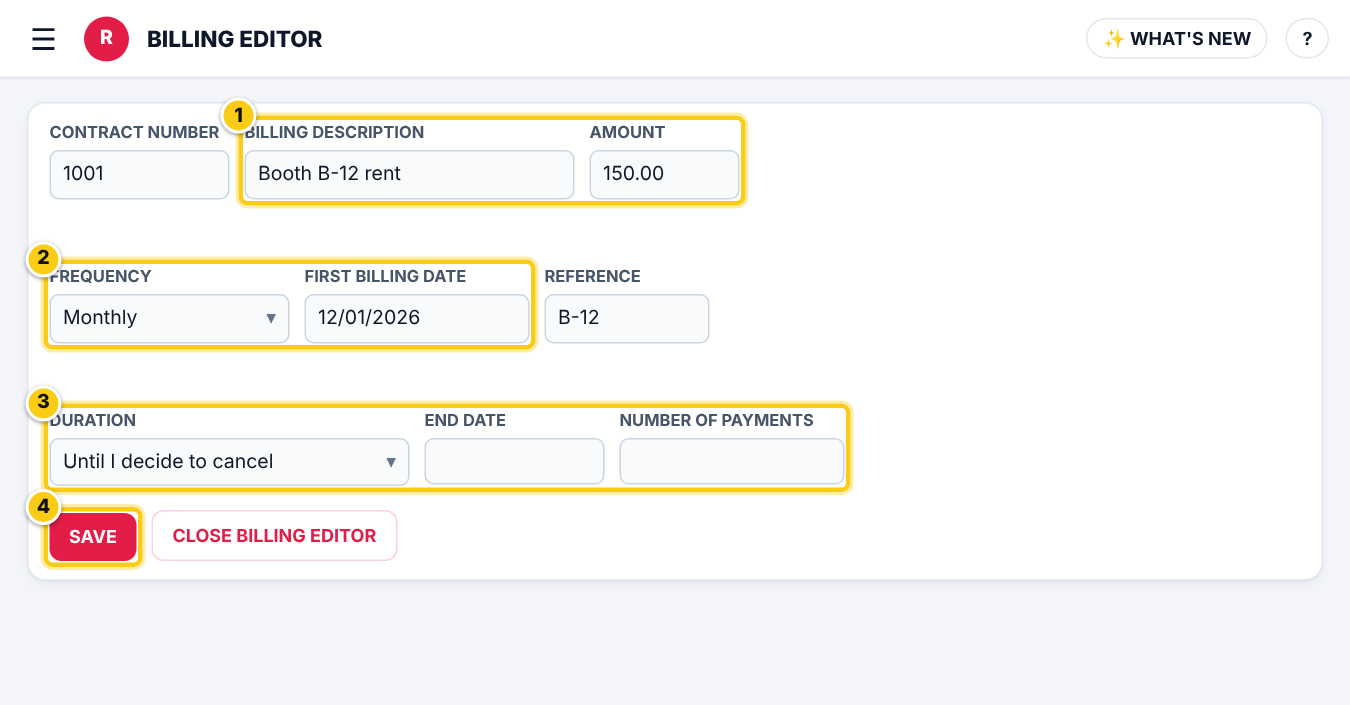
(1) description and amount, (2) how often and the first date, (3) how long, (4) SAVE.
| Field | What it means |
|---|---|
| BILLING DESCRIPTION | What the charge is called on the account activity and reports. |
| FIRST BILLING DATE | The first charge. The next ones follow the FREQUENCY from this date. |
| DURATION | When it stops: when you cancel, on an end date, or after a number of payments. |
| REFERENCE | Optional, for your own reference (for example a booth number). |
When the charges post
- Rose checks the bills every 15 minutes and posts each charge on its date, as a FEE on the account. It shows in the account’s activities, the Fees reports and the next payout, where it is taken off what they are paid.
- If the first billing date is in the past, Rose asks CHARGE PAST DATES? before saving. Choose NO and set the date to today or later to charge only from now on.
- Changing how often or the first date of a bill that has charged starts its schedule again from the new date; charges already posted stay.
Stop or change a bill
- Open the BILLING EDITOR for the contract.
- Press EDIT to change the amount, schedule or duration and SAVE, or DELETE and confirm with YES DELETE to stop it.
- Deleting a bill stops future charges. Charges already posted stay on the account; remove one from the contract’s PAYOUT page if it was a mistake.
New vendors without steady sales
A bill is paid out of the vendor’s sales. A new vendor who isn’t selling much yet can end up owing you. For them, press SQUARE RECURRING INVOICE in the Billing Editor: Square sends an invoice on schedule and they pay it by card or bank (with automatic payments if they choose). When their invoice payment comes in, the sales batch shows it purple and puts it on their account at 100%, so it pays off the Rose bill.
Who can do this (user rights)
| Right in User Maintenance | What it allows | Who has it at first |
|---|---|---|
| Contracts: recurring billing (BILLING) | Shows BILLING on Contracts to create, change and delete bills. | Users with that right ticked in User Maintenance |
Questions
I saved a bill for today. Why isn't it on the account yet?
Rose posts charges every 15 minutes. It shows on the account within a quarter of an hour.
Can a bill charge more than the vendor has sold?
Yes. The charge posts whatever the balance, so the account can go below zero until they sell or pay. For new vendors, a Square recurring invoice avoids that.
Where does booth rent from the Floor Map go?
Booth rent set on a Floor Map spot is a bill like these (reference FLOOR-SPOT-…), so it shows and can be changed here too.
Still stuck? Ask Rosebot (the bubble at the bottom right of Rose and myPortal) or contact Consignor Connect support.