![1512632091642-p-500.png]](https://help.consignorconnect.com/hs-fs/hubfs/1512632091642-p-500.png?width=131&height=50&name=1512632091642-p-500.png)
Still on Classic Rose? See the Classic Rose steps.
The Contract List report: every consignor and vendor with their contact details, balance and items in stock.
Run the report
- Open Menu → Reports.
- In FINANCIAL REPORTS, pick Contract List.
- Press VIEW / PRINT for a printable list, or EXPORT CSV for a spreadsheet.
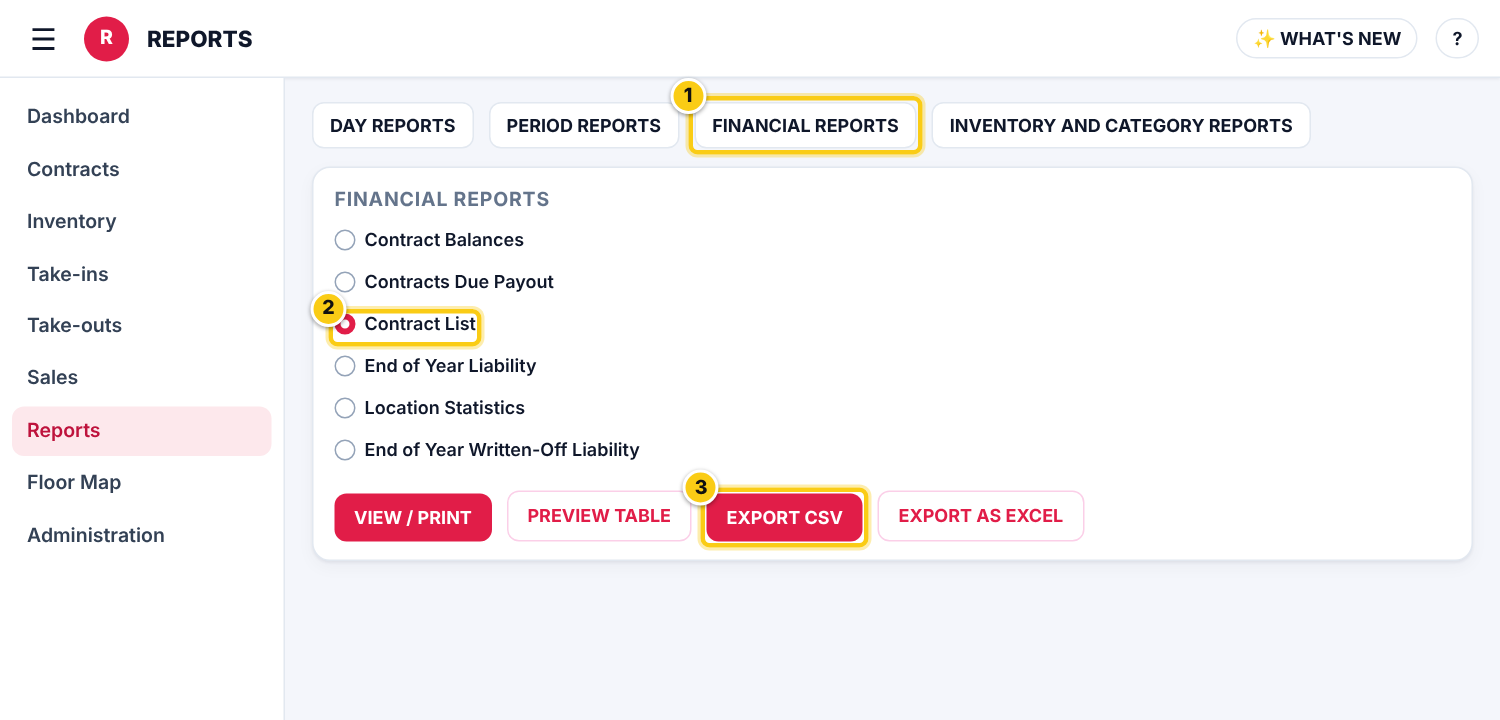
(1) FINANCIAL REPORTS, (2) Contract List, (3) EXPORT CSV for a spreadsheet.
Print it or open it in a spreadsheet
- VIEW / PRINT opens the report as a PDF to print or save.
- PREVIEW TABLE shows it on screen.
- EXPORT CSV downloads the data with the consignors’ contact details for Excel or Google Sheets; EXPORT AS EXCEL saves the printed report as an Excel file in your File Manager.
Who can do this (user rights)
| Right in User Maintenance | What it allows | Who has it at first |
|---|---|---|
| Reports | Shows Reports in the menu. | Users with Reports ticked in User Maintenance |
Questions
I only want consignors I owe money to.
Pick Contract Balances instead: only accounts with a balance due above zero. Contracts Due Payout adds the ones not paid in a number of days (NOT PAID IN (DAYS)).
Still stuck? Ask Rosebot (the bubble at the bottom right of Rose and myPortal) or contact Consignor Connect support.