![1512632091642-p-500.png]](https://help.consignorconnect.com/hs-fs/hubfs/1512632091642-p-500.png?width=131&height=50&name=1512632091642-p-500.png)
Contract numbers, the default split, the store account, the welcome e-mail, take-in receipts and sales e-mails - everything a new contract starts with.
Open the consignor settings (Rose)
- Open Administration → SETTINGS → CONSIGNORS.
- Change what you need and press SAVE (cards with their own button, like SAVE E-MAIL SETTINGS, save on their own).
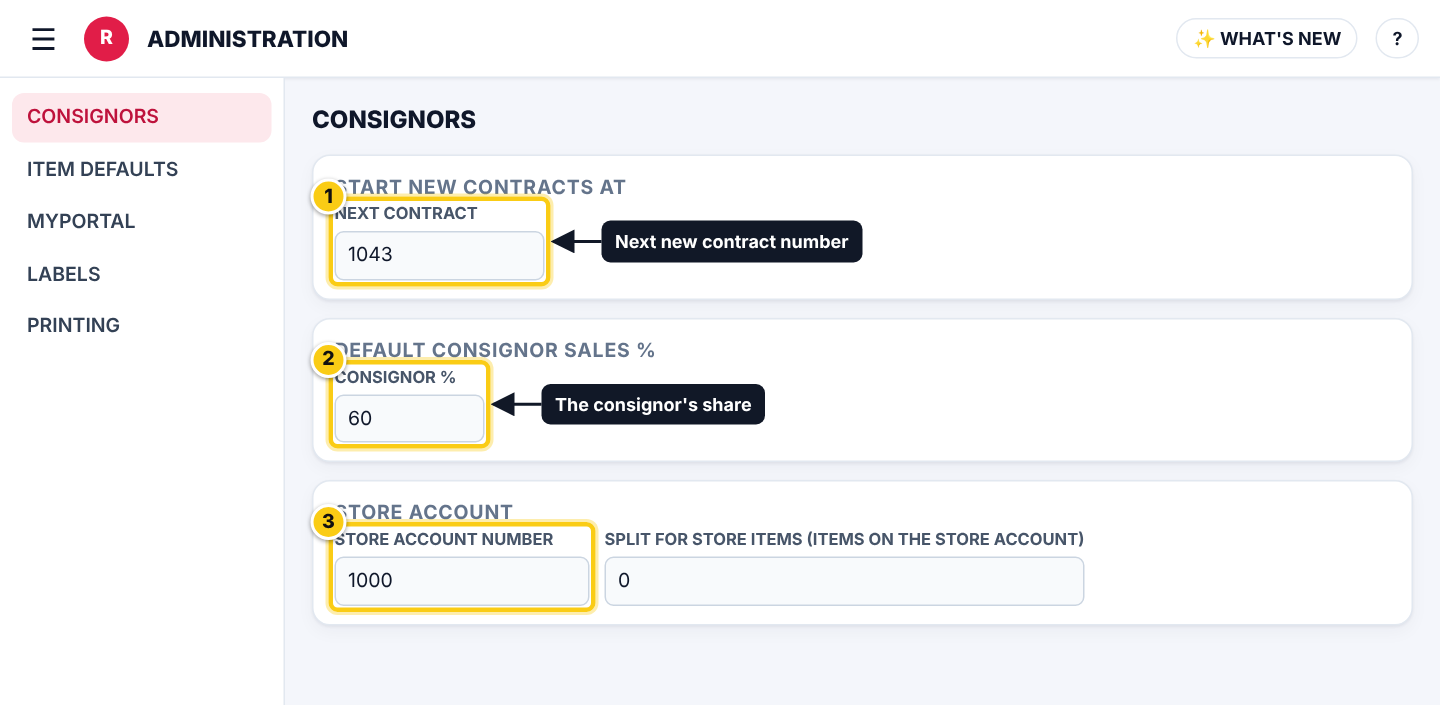
(1) next contract number, (2) the default split, (3) the store account.
What each setting does (Rose)
| Field | What it means |
|---|---|
| START NEW CONTRACTS AT | The next new contract gets this number; it moves on after each one. Enter a whole number like 1001. |
| DEFAULT CONSIGNOR SALES % | The consignor’s share a new contract starts with. Each contract can have its own split. |
| CONSIGNOR ONBOARDING E-MAIL | The welcome e-mail with a one-time myPortal sign-in link, sent from a contract or by INVITE TO MYPORTAL. |
| STORE ACCOUNT NUMBER | An existing contract that holds the store’s own items. Its first name becomes STORE ACCOUNT. |
| SPLIT FOR STORE ITEMS | The split used for items on the store account. |
| TRANSFER EXPIRED ITEMS | Move expired items to the store account (or donate them) on a schedule. |
| PAYOUT RULES | How discounts and card fees change payouts. See Payout rules. |
| TAKE-IN RECEIPTS | Whether take-in receipts are e-mailed to the consignor and shown in their myPortal documents. Staff can still change it for one receipt. |
| SALES E-MAILS (ROSEBOT) | Consignors and vendors get e-mails about their sales. NEW CONTRACTS START WITH SALES E-MAILS TICKED sets the starting box; each contract can still change it in ALTER → MYPORTAL AND E-MAILS. |
Per-contract choices (Rose)
- Open Contracts → ALTER on a contract to change its own split, item defaults, myPortal and e-mail choices, and WHEN AN ITEM DOESN’T SELL (see Return or donate).
- Changing a store default never changes existing contracts.
Who can do this (user rights)
| Right in User Maintenance | What it allows | Who has it at first |
|---|---|---|
| Administration and Subscription Plans | Opens Administration → SETTINGS. | Users with Administration ticked in User Maintenance (normally administrators) |
Questions
Can I skip contract numbers?
Yes. Type a higher number in START NEW CONTRACTS AT; Rose asks whether to skip the unused numbers.
Still stuck? Ask Rosebot (the bubble at the bottom right of Rose and myPortal) or contact Consignor Connect support.