![1512632091642-p-500.png]](https://help.consignorconnect.com/hs-fs/hubfs/1512632091642-p-500.png?width=131&height=50&name=1512632091642-p-500.png)
See what the paid myPortal plans add, subscribe, and cancel any time.
See the plans (myPortal)
- Open the menu → SUBSCRIPTIONS (or UPGRADE TO PRO / SEE THE PLANS).
- Each plan shows what it adds and its price. WHAT’S IN PORTAL PRO opens the full list.
- Vendors: Portal Pro adds item photos, variations, printing many labels at once, KloudPrint printing and COUNT MY ITEMS.
- Consignors: plans add sales e-mails and exports, the Rosebot assistant, or both with Consignor Pro.
- If your store pays for your plan you’ll see PAID BY YOUR STORE.
Subscribe or cancel (myPortal)
- Press SUBSCRIBE (or GET PRO) and pay on the secure page.
- To cancel: MY ACCOUNT → MY SUBSCRIPTIONS → CANCEL, then YES, CANCEL IT. What you paid for stays on until the period ends.
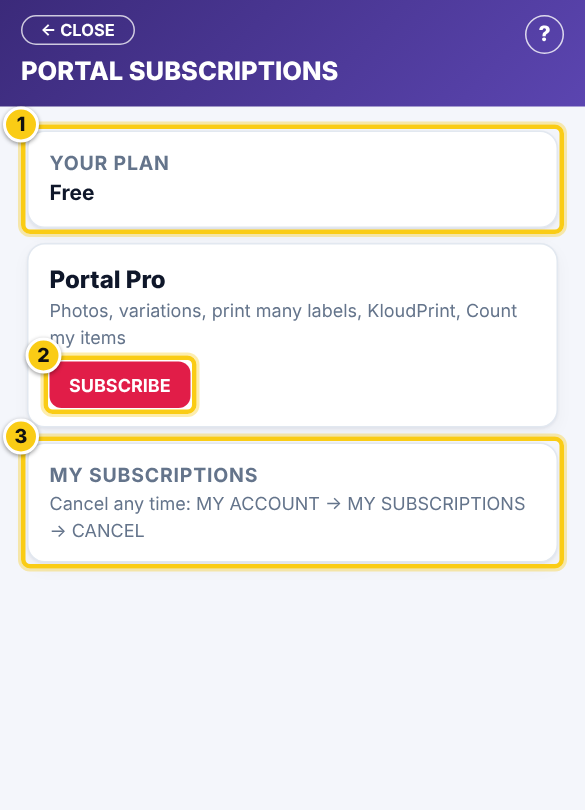
(1) your plan, (2) SUBSCRIBE, (3) cancel any time.
Questions
Is there a contract?
No. Plans are monthly and you can cancel any time in myPortal.
Still stuck? Ask Rosebot (the bubble at the bottom right of Rose and myPortal) or contact Consignor Connect support.