![1512632091642-p-500.png]](https://help.consignorconnect.com/hs-fs/hubfs/1512632091642-p-500.png?width=131&height=50&name=1512632091642-p-500.png)
Record what each consignor wants done with items that don’t sell - returned or donated - on the contract and on each item, and print it on the tag.
Set the consignor's choice (Rose)
- Open the contract, ALTER.
- Set WHEN AN ITEM DOESN’T SELL to RETURN or DONATE (or NOT SET) and save.
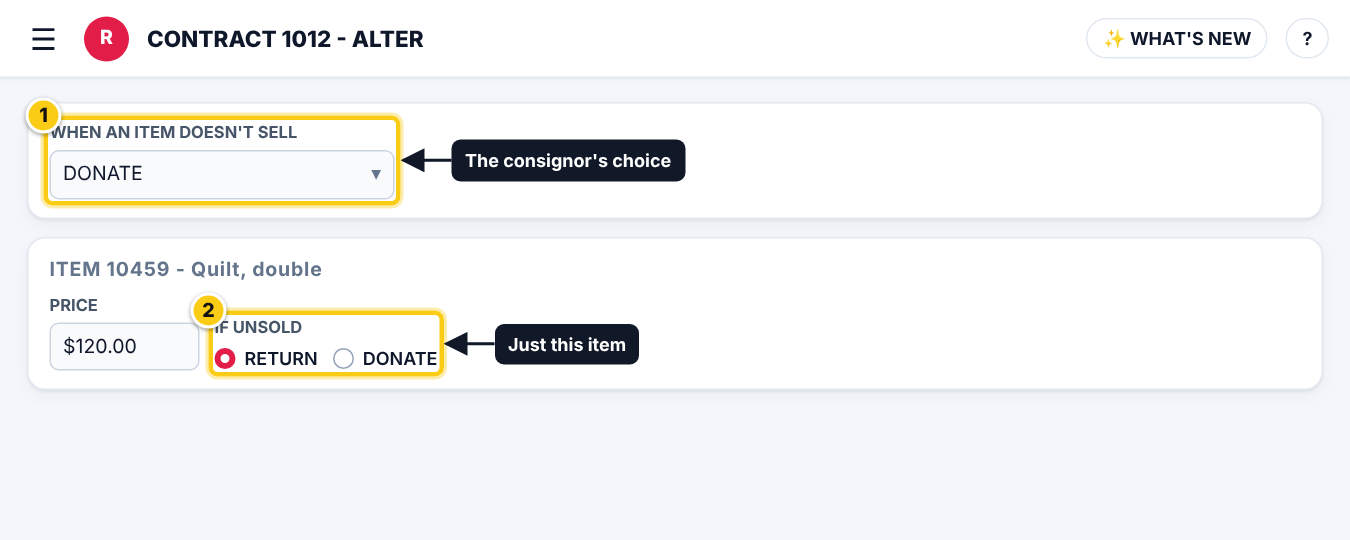
(1) the contract’s choice, (2) one item’s IF UNSOLD.
Change it for one item (Rose)
- On a take-in or in the item editor, IF UNSOLD starts with the consignor’s choice.
- Pick RETURN or DONATE for that item only.
- The choice goes with the item from take-in to inventory to take-out.
- Add the RETURN / DONATE piece in the LABEL DESIGNER to print it on tags.
Who can do this (user rights)
| Right in User Maintenance | What it allows | Who has it at first |
|---|---|---|
| Contracts | The contract’s choice. | Users with Contracts ticked |
| Take-ins / Inventory | One item’s IF UNSOLD. | Users with Take-ins or Inventory ticked |
Questions
Does Rose donate items by itself?
No. It records the choice and prints it; your staff still do the take-out or the transfer of expired items.
Still stuck? Ask Rosebot (the bubble at the bottom right of Rose and myPortal) or contact Consignor Connect support.
Need more help? Visit the Help Center on our website, consignorconnect.com, ask your Rosebot, or email support@consignorconnect.com.