![1512632091642-p-500.png]](https://help.consignorconnect.com/hs-fs/hubfs/1512632091642-p-500.png?width=131&height=50&name=1512632091642-p-500.png)
Still on Classic Rose? See the Classic Rose steps.
In each screenshot, the yellow boxes show what to click. Numbers give the order.
Overview
Time-based discounting marks items down automatically as they age. You choose up to three steps, for example 20% off after 30 days, 30% off after 60 days and 50% off after 90 days. An item's age counts from its shelf date, the day it went on the floor. Square applies the discount at the register.
Each location has its own markdowns, so your clothing store and furniture store can use different steps.
Where to find it: Dashboard › menu (☰) › Location/Discounts › pick the location › MARKDOWNS BY AGE.
Set up markdowns by age
1. Open the menu (☰) and click Location/Discounts.
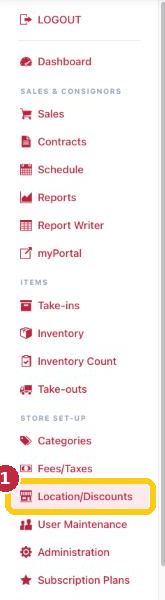
Click Location/Discounts in the menu (1).
2. Click the location you want to discount.
3. Click the MARKDOWNS BY AGE tab.
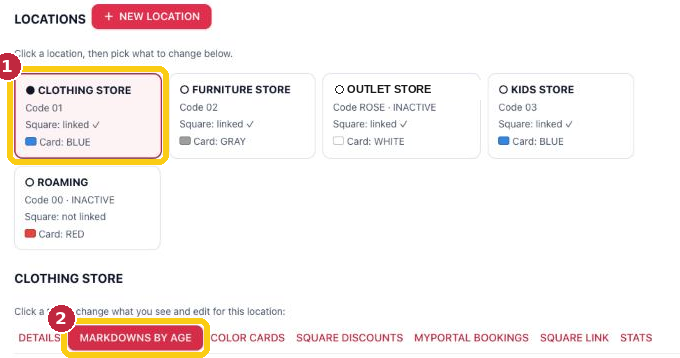
Pick the location (1), then MARKDOWNS BY AGE (2).
4. For each step, enter the number of days on the floor and the DISCOUNT%. Type 20 for 20%. Leave a step at 0 if you don't need it.
5. Want shoppers to see the lower prices ahead of time? Tick SHOW DISCOUNT TIERS ON LABELS. New labels then show the price at each step.
6. Click SAVE AND UPDATE.
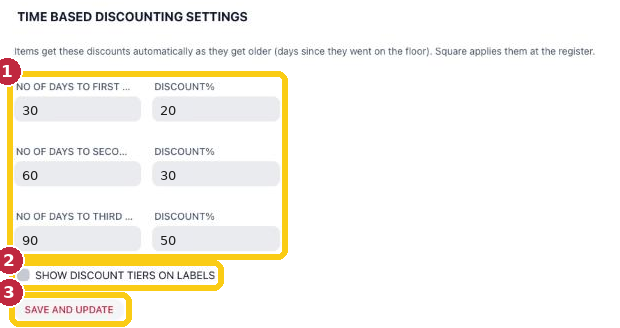
Example: 20% off at 30 days, 30% at 60 days, 50% at 90 days (1). Tiers on labels (2), then SAVE AND UPDATE (3).
Discounts start right away. As soon as you save, every item already older than a step gets that discount, unless the item is set to NO DISCOUNTING. Don't save markdowns until you're ready for them.
Keep an item at full price
Open the item in Inventory with its ALTER pencil, tick NO DISCOUNTING, and save. See Altering Existing Inventory.
To keep all of one consignor's items at full price, tick NO DISCOUNTING under ITEM DEFAULTS on their contract. New items for that consignor start with it ticked.
Questions
Who pays for the discount, the store or the consignor?
You decide in Administration › SETTINGS › CONSIGNORS › PAYOUT RULES: the business, the consignor, or shared by the split. Rules apply to sales posted from then on.
What other discounts can I use?
The same location has COLOR CARDS (color tag discounting) and SQUARE DISCOUNTS tabs. See Color Card/Tag (Label) Discounting.
Need more help? Visit the Help Center on our website, consignorconnect.com, ask your Rosebot, or email support@consignorconnect.com.